Showing posts with label Gameplay. Show all posts

Thursday, 7 April 2016

Greybox, Final Post

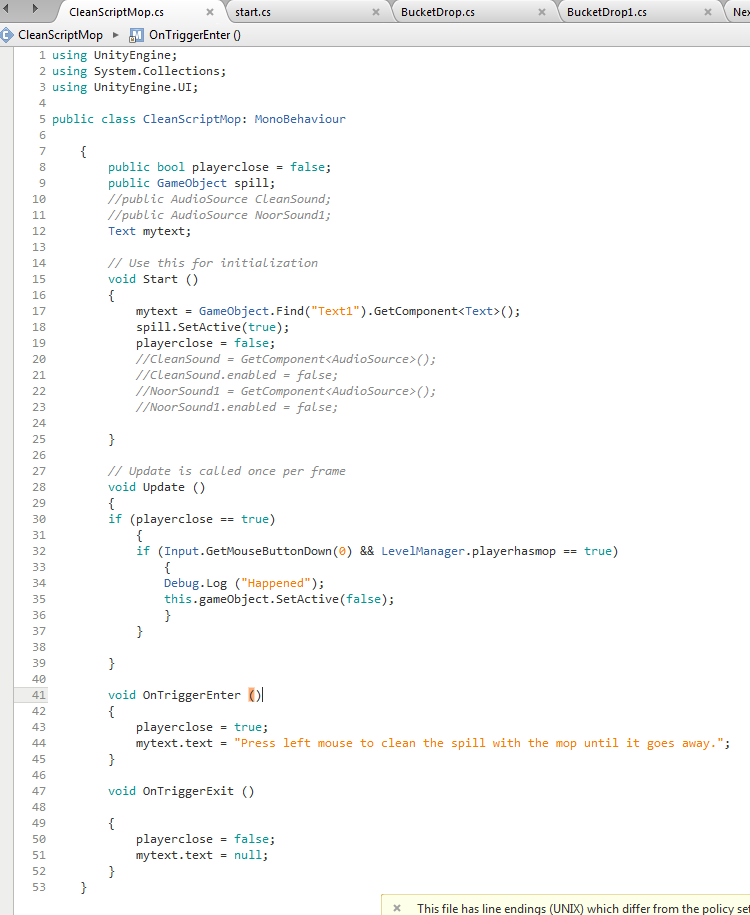
For the final iteration of my game, I made major changes. For example the game now had code that enabled the player to pick up a cart and place it down at the required spot. The player was also able to take a mop out of the bucket and use it on spills on the floor. 

Code that allows the player to clean spills as long as he has a mop. 
I was also able to make a script that spawns new spills with a sound effect once three spills are cleaned up.


I have to say I was quite pleased with the outcome, I managed to make cool script functions that allowed the player to progress though the level. 

Thursday, 31 March 2016

2D game assignment Dev Blog - Week 6 & 7

"So how's your project going?"

Me: 

Warren, who had vanished off the face of the earth, was tasked with making the levels for the game. But with him gone I had to do that myself, which was more work. Ray, who pretty much was in the same situation was Warren, wasn't in at all, despite the fact that he only had the simple task of making icons for the game. I mean he made the icons, just he didn't give them a transparent background, so I was unable to add them to the game without them looking like clip art.

Paris was on and off with avalibility, something would always pop up and she would be unable to do whatever task that she was set. 

Irina was the only one who turned up to each group meeting we had every week, when since week 3 no one else would come in. She also was the only one who would do tasks when set and deliver results in time. 

More and more I was starting to hate group work. I had to take over other peoples work because I could not get in contact with them, or because something would pop up and they would be un able to do the task.

Seeing as Irina was the only one with determination to work on the project, I set her the task of coming up with some concepts for some main villains of the game. 

Anyway that's all for this post. Until then, toodles.

2D game assignment Dev Blog - Week 5

So Warren turned up with something cool this week, a main menu for the game, and stuff.

Well that was the only thing he came up with really.

Yes that's right everyone, our game now has a main menu, one that is animated with flying cars, and what I can only describe as even more flying cars.

Even better was the fact that the menu buttons worked, they loaded levels too, woo.


Honestly when I first saw this I was quite blown away, the whole background with the menu design and moving cars looked so sleek and nice. 


And really that's all Warren did in terms of gameplay. Since then he's disappeared. Some say he's still out there, playing videogames and doing the odd drawing now and then. But in truth we'll never know.

Oh also I gave the character a health system. Awh yeah. Now the player can take damage from triggers (which can act as traps)

Jake (Another group leader who I really wish I was working with) showed me how to make some sweet stuff like enemies and other cool stuff like enemy health. I tied this into the health system which now allowed the player to take damage from enemies. Or as we didn't have enemies yet, giant placeholder images. 

I also tasked Irina to make a sprint system for the player, and she delivered the same day. She didn't just make a sprint system, she also made it so the player would slow down while taking damage which was awesome. 

Finally the game was getting somewhere. 

2D game assignment Dev Blog - Week 4

Week 4 we hit a road block.
And I mean a really, really big roadblock.

We had two major problems, well actually three but I was ignoring the third one hoping it went away.
The first was that we had a problem with the gun script. For some reason the bullets were not going were we wanted them to. Not in the way that they were flying about the screen like someone gave a toddler a uzi. Instead they were not hitting where we clicked. Somehow even though the bullets were going in the direction that the player was shooting, they weren't hitting anything.
This didn't make sense. At all.

Added to that we still had trouble getting guns to enable when the player activated a pickup.
The thing was we had tried out multiple ideas to get the gun to work after pickup. Like for example the gun prefab being attached to the pickup. Then again we were in experienced with coding, so none of the ideas worked. 

So like all great developers we asked Ewan for help.

Thankfully Ewan was able to help us sort out the pickup problem. Instead of the gun being a separate object to the player, we kept the gun attached to the player, but disabled it on game start up. It was only after the player activates the pickup that the gun is enabled. How cool is that.

Now the bullet problem, we tried a number of things to get the bullets to go where we wanted them to, like a bullet target that was attached to the mouse, and other things. But in the end nothing worked, the idea had us all stumped as to why the bullets would go in the direction we wanted them to, but not hit anything.
Then I noticed I was an idiot and had the bullet prefab rotated slightly, so it was going in the direction we wanted, just the aim was off a bit. 

Honestly though without Ewan we would not have been able to figure out the problem with the pickup script, and other code problems.

Bless you Ewan our savior.

[ARTIST CONCEPTION]

2D game assignment Dev Blog - Week 3

Aww yiss here we go


Ladies and gentlemen, we finally had guns implemented in our game. After three weeks in development, hopefully it was worth the wait. Now instead of jumping around and flying off into space, thanks to no ground check, we finally had a game mechanic that allowed the player to go postal on the game's non existent enemies.

Snippit of the gun code.


Thanks to endless web page searches and YouTube videos, I found out how to use raycasts to make bullets appear and stuff. I was pretty pleased with managing to get a working script that spawned instantiated bullet prefabs, that appeared from a firepoint. 

[VIDEO OF ME SHOWING OFF THE GUN SCRIPT]

Also Paris made a start on the pickup script, we now had an object with pop up text that would disappear if the player pressed "E" while in the trigger. 

Before I forget, I also added in a re-spawn system, that reset the player back to the start if he was an idiot and fell off the level somehow. Nioce.

We did have one problem though. How do we make an gun appear out the pickup?


2D game assignment Dev Blog - Week 2

Since our first week we started to work on the game. I assigned tasks to different people in the group based on what needed to be done. Warren was set to do the main menu, Irina more character concepts for the villains and enemies, and Paris was tasked to make a pickup script. We also had a new group member, Ray. Ray was tasked to make pickup icons for the game, while I set myself to make movement scripts for the character as no one else said they were confident with scripting. 

The first thing I set out to do was to make a movement script for the character, at the time I had a lot of problems. First thing was I had no clue what so ever how to code. I made a trigger work once on my own and that was it. Yes. One trigger. 

So as you can imagine I ran into a lot of trouble trying to get the character to move. Ages was spent trying to figure out how to actually apply force in one direction. The main problem was that I had no clue how to go about this as I was new to scripting. 

It took roughly three days of trail and error before I said "fuck it"and copied lines of the script that were used in a standard unity project, and wrote them out in my project.

I the end I (somehow) managed to get the player to move, so now the player could jump around and stuff woo yay wow well done yippie yay.


[REENACTMENT OF WHEN THE SCRIPT MANAGED TO WORK]


Also I went about making some more concept art images for the game. The first one was a concept of what one level in the game could be like, while the second was a cover for the game itself.


Friday, 11 December 2015

Greybox

For our first level we were tasked with not only making the scene in Maya, but also coding the level too. 

Out of all the classes I found the coding part to be particularly the hardest, as I could not wrap my head around how code worked. For my greybox level I decided to try and go for something short and simple. The original plan was to make a small level where you played as a janitor in a shopping store, cleaning up spills and mess. However the task soon became more than I expected in terms of work.


First I designed a plan for my first level, it was to be a simple store area so most of the map would be filled with store shelves. Other parts, like at the back area, would have different things like boxes or barrels.
At the front of the store I even moddled a parking lot, cars and high street to help make the level feel like it is a store.


Out of all the parts of this project, modeling was the most easiest. As we were not allowed to texture I found it easy to make models that didn't need much complexity.

Over the course of the project the store underwent many re-designs and re-modeling. For instance the first export of the store was just a room with an entrance and shelves, but over time more detail was added like small shelves and boxes, and  even doors.


Admittedly I wasn't expecting the coding part of the course to be an easy task at all, after hearing so many horror stories about programmers trying to code. I myself found the coding to be particularly tricky, most of the time I would have to ask for help when trying to script things to work.


After a while though  I sort of got the hang of the use of scripting. In my latest build I was able to script events like sounds or even objects that disappear when the player clicks on them, if he is in a trigger.

In the end I have to say I was kind of satisfied with my first level, I managed to get some events working and scripting, and the main level area looked appealing.


Sunday, 11 October 2015

First level map

For the first level of my game I was also tasked with making a map as well as a storyboard.


In the map you can see some areas are labeled with spills and bonus spills. I did this because in the level I wanted to player to have a main objective as well as a bonus objective. This would give the player something to do if he wanted to go though the level once again.

Most of the map is filled with store shelves. This is because in the main game I want the player to explore the area or find the objective area by looking out for the designated isle, which is usually pointed out by the signs that hang above them in stores. 

This will allow the player some freedom in trying to find the objective area, instead of being tunneled towards the objective.

In the level the player also starts off in a backroom, which can give him a feel for the controls before triggering the first objective. 

First level storyboard

For the first level of my game I was instructed to make a storyboard of all the important events that would happen in the level. The game itself was to be set in a supermarket, an odd setting but never the less an interesting one. 

Below is the storyboard of the level. 


In the storyboard I mapped out 6 major events in the level, all which required scripts or triggers to be used. Most of the triggers relate to cleaning up a section of the store, for example coming across a spill and a trigger box allows you to stop your cleaning cart and take out your broom. Another is causing a sound effect to play over the tannoy system to the player, directing him to a spill of some sort. 

Other scripts would just be for allowing the player to open doors or corner off spills in an area. Though overall the level would hopefully not be that script intensive.